

Most people who work with SAP will never lead a data migration. You configure, develop or support the system, and the migration happens once, somewhere nearby, usually to another team. It is easy to think of it as a technical step at the end of a project: load, check, go live.
It is not. Data migration is its own workstream, with its own scope, its own team, its own evidence and its own ways of failing.
There is also a clock on it. SAP provides mainstream maintenance for the core applications of SAP Business Suite 7 through the end of 2027, followed by optional extended maintenance through the end of 2030. [1] Companies still running ECC need a deliberate transition plan, not a late technical exercise.
I have spent a long time delivering SAP for large enterprises. Data migration is the workstream I have seen underestimated most consistently – not because people are careless, but because much of the work stays invisible until the team is already inside it.
Scope of this article. I am describing initial data migration from ECC into a new S/4HANA implementation, with Cost Center as the first object. A system conversion or a selective data transition follows a different technical path.
What I set out to build
Some months ago I started a project called SafeBridge. The idea was simple, and with AI agents it felt achievable: automate the ECC-to-S/4HANA data migration end to end. Extract, transform, validate, load, and prove that it worked. Let the agents do the work and let the human watch.
I spent too much time on the architecture before spending enough time on the domain. After working through SAP’s current Help content, the openSAP course material and the 2026 edition of Migrating to SAP S/4HANA, the problem turned out to have a different shape than I had assumed.
The project did not need a more ambitious loader. It needed a more honest boundary.
What the Migration Cockpit actually covers
The SAP S/4HANA Migration Cockpit is SAP’s standard application for initial data migration. It can use staging tables populated through XML or CSV files, or it can transfer data directly from supported SAP source systems. It processes mapping tasks, can simulate the migration, performs the migration and reports the result. [2]
That distinction matters, and I had it wrong at first. The comparison table in the book records “no data extraction” against the file and staging variant of the cockpit – not against the whole product. The same table describes Direct Transfer as having a direct connection to supported SAP source systems and processing the selection of source data. [3]
For S/4HANA 2025, SAP documents Cost Center for both Staging Table and Direct Transfer – ERP. From 2025 FPS01, Direct Transfer can also hold selected data in staging tables in a remote SAP HANA schema before migration. [4]
That correction changed my design. A custom extractor must not be assumed for every standard object. The first question is whether SAP’s supported Direct Transfer already supplies the required population and evidence. Custom ABAP belongs later, and only where a demonstrated gap remains.
What still sits outside the load
Extraction is only one part of the problem. A transfer tool does not decide which records the business actually wants, which dormant records may be excluded, whether a proposed value mapping is acceptable, or whether the final target attributes carry the approved business meaning. The cockpit also does not cleanse the source data on the customer’s behalf.
SAP Data Services and other data-quality or ETL products address parts of that work. They also bring their own implementation, infrastructure, licensing and operating decisions. In many projects the unresolved work therefore continues where it always has: in spreadsheets, workshops, email and consultant knowledge.
The number I keep coming back to
In the work package covering test loads, the book lists ten durations worth measuring – extraction, validation and correction, template population, file transfer, staging, mapping, preparation, simulation, migration, and post-migration validation. The authors then recommend spending most of the migration time, often around three quarters, on validation. [5]
That is an author recommendation drawn from project experience, not a published SAP benchmark. But the direction is persuasive. In practice teams record the duration of the load, because it is the easy thing to measure, while the analysis, waiting, rework and validation around it stay uninstrumented.
The cheapest record to migrate is the one you do not need
The same book describes a customer that planned to migrate 300,000 suppliers. After analysis, roughly 5,000 were considered necessary for the target business processes; the rest were irrelevant or inactive. [6]
That is not a universal ratio. It is a demonstration of what scope analysis is worth. A loading tool cannot reach that conclusion by itself – the answer depends on source evidence, target processes, retention requirements and an accountable business owner.
Where the hours actually go
Laid out honestly, the work separates into two very different kinds of effort.
Decision work. Which Cost Centers remain in scope. Whether an unused record is dormant, obsolete or legally required. Whether an old profit center should be mapped, replaced or created in the target. Someone has to own the consequence of being wrong.
Repeatable work. Comparing structures, checking mandatory values, applying approved mapping rules, grouping hundreds of identical errors into a few causes, preserving record lineage, producing correction worklists and reconciling the result. Once the rules are approved, most of this can be deterministic and testable.
The second group is the larger share of the hours. It is manual not because it is difficult, but because nobody built for it.
What AI can and cannot automate
This is where my original plan was wrong, and it is the part worth taking away.
I had been aiming AI at the decision work – the interesting half. That cannot be delegated, and after this year I no longer think it should be. The consequence of a wrong scope decision lands on a named person, and accountability does not survive being handed to a model.
What AI turned out to be genuinely good at is the surrounding work:
- proposing a field mapping from the source and target structures, for a human to confirm
- reading several hundred failed records and reporting that they are four problems rather than four hundred
- suggesting which team owns each cause
- recognising that a finding on one object will recur on the next three
- drafting an extractor design for developer review, where no standard mechanism covers the source
And what it must not do: decide that a record may be posted, change an approved mapping, authorise a load, or certify its own output.
The rule I ended up with is short. AI proposes, deterministic checks evaluate, accountable people approve. It is less exciting than full automation. It is also the only version I would put in front of an auditor.
The practical effect is not a smaller human role – it is a smaller number of human decisions, each arriving with the evidence already assembled. Four hundred error records become four decisions. That is the actual saving, and it has nothing to do with model capability.
Three changes I would make in any migration plan
None of these need new software.
- Start source analysis and scope decisions during preparation. Not at the first serious test load.
- Measure the complete cycle, from source selection through final business validation, including human waiting time and rework. One duration is not a cutover plan.
- Make volume reduction and approved exclusions formal deliverables, with an owner and preserved evidence.
What I am building now
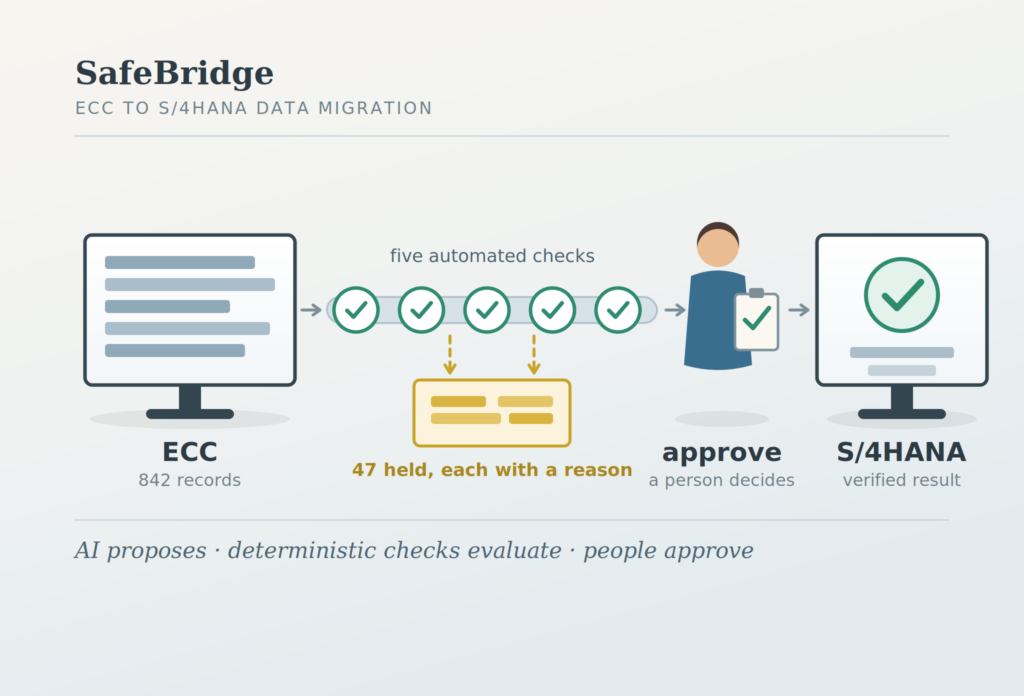
SafeBridge is no longer a migration engine. SAP keeps the supported selection, simulation and posting runtime; I am building the validation and evidence layer around it – what must be known before the load, and what must be proven afterwards.
It is organized as five technical checks and three explicit human approvals, with the principle that no record leaves the process without a reason code and an owner.
The next post describes that model, including the failure and correction paths, which are the part most migration tooling leaves out.
For anyone who has led an SAP data migration: which part of the cycle actually consumed the most time – and did the project measure it, or is it a feeling we all carry?
Sources
[1] SAP Support Portal, maintenance dates for the core applications of SAP Business Suite 7.
[2] SAP Help Portal, “Migrate Your Data” – SAP S/4HANA Migration Cockpit, S/4HANA 2025.
[3] Densborn, Finkbohner, Höft, Klöß, Mathäß and Rubarth, Migrating to SAP S/4HANA: Operating Models, Migration Scenarios, Tools, and Implementation, 4th edition, SAP PRESS / Rheinwerk, 2026 – Chapter 17, tool comparison.
[4] SAP Help Portal, S/4HANA 2025 / FPS01: available migration objects; Direct Transfer with intermediate staging.
[5] Densborn et al., Chapter 12, work package “Provide/load test data”.
[6] Densborn et al., Chapter 12, “When 300,000 Data Records Become 5,000 Data Records”.